

Tuesday 6 December 2011


Elven Princess
Tutorial written by and © to Bits N Bobs 6th December 2011.
Results are for personal use only.
No monetry gain allowed and that includes placing them behind a paid or donation based membership area.
You are not allowed to share/forward or translate any of my tutorials or place them on any blog, website, DVD or anywhere else without my permission.
These tutorials are written from my own ideas and any similarities to any other tutorial is purely coincidental.
All tutorials are for those with a working knowledge of paintshop pro.
I reserve the right to amend these terms at any time.
Supplies needed.
Font of choice for your name.
I am using Nueva Std Cond
Tube of choice.
I am using Elven Princess by Amberly Berendson
Tube is not to be used without an MTA license
AAA Frames - Photo frame
Note
This tutorial was written in PSP 9
Open all supplies in paintshop except the font.
Double click on your font and minimize.
Open a new image, 600 w x 250 h at 72 dpi.
1.Copy the image layer from your tube,
paste as a new image.
Effects/ image effects/ seamless tiling.
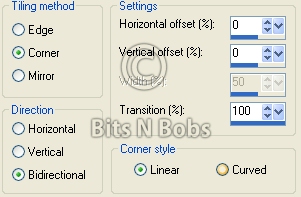
2.Activate your blank working image,
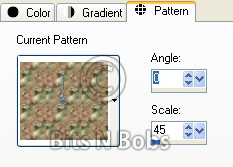
flood fill with patter using the seamless tile you just created
Angle 0, Scale 45
3.Effects/ plugins/ foto frame/ AAA frames/ Foto frame
Settings as in the screenshot below.

4.Copy your main tube,
paste as a new layer onto your working image,
image/ mirror, position to your liking.
Add a drop shadow of choice.
I am using V3 - H5 - O1000 - B7.00 - C #000000
5.Layers/ new raster layer,
Selections/ select all, Selections/ modify/ contract,
contract by 5, Selections/ invert.
Flood fill with a colour from your tube.
I have used #41512d
Selections/ select none.
6.Layers/ new raster layer, name it copyright.
Add all your copyright info.
Export as a jpg and save.
7.Re-size your tag 65% all layers tabbed.
Edit/ copy merged.
Open a new image 150 x 150 for your avatar.
Paste as a new layer , Image/ mirror,
position to your liking.
8.Layers/ new raster layer,
Selections/ select all, Selections/ modify/ contract,
contract by 5, Selections/ invert.
Flood fill with a colour from your tube.
I have used #41512d
Selections/ select none.
Add copyright info.
Export as a jpg and save.
Subscribe to:
Post Comments
(Atom)
Stores


BNB Blinkie



0 comments:
Post a Comment