
Monday, 21 November 2011

Tutorial written by and © to Bits N Bobs 21st November 2011.
Results are for personal use only.
No monetry gain allowed and that includes placing them behind a paid or donation based membership area.
You are not allowed to share/forward or translate any of my tutorials or place them on any blog, website, DVD or anywhere else without my permission.
These tutorials are written from my own ideas and any similarities to any other tutorial is purely coincidental.
All tutorials are for those with a working knowledge of paintshop pro.
I reserve the right to amend these terms at any time.
Supplies needed.
Font of choice for your name.
I am using Bickley Script Plain
Tube of choice.
I am using one by DiMary
Mine is Snow Maiden and available at Pics For Design
Tube is not to be used without the correct licence.
Scrap kit Mary Christmas by Bits N Bobs
Items I have used from this kit are...
Paper 3, MC 6, MC 23, MC 53, MC 63, MC 70,
Mask of choice. I am using mask 25 by Gabee
Note
This tutorial was written in PSP 9.
Open all supplies in paintshop except the font and Mask.
Double click on your font and minimize.
Install your mask.
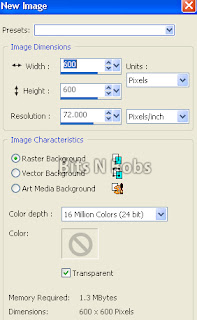
1.Open a new image 600x600 at 72 pixels per inch.
2.Copy your paper.
Paste as a new layer.
Image/ re-size, re-size 60% all layers un-tabbed.
Layers/ Load,save mask/ load mask from disk.
Find Gabeemask25, Source luminance checked, Fit to layer checked,
Invert Transparency checked, Hide all mask checked.
Image/ rotate/ free rotate 90 right all layers un-tabbed.
Layers/ merge/merge group.

3.Activate your masked layer,
Copy your tube, paste as a new layer.
Re-size, I have re-sized 60%, Image/ mirror
Position to your liking,
Layers/ properties, change the blend mode to Overlay.
Erase any parts you don't want showing.
4.Copy MC63 Paste as a new layer.
Image/ re-size, re-size 60%
Copy MC23, paste as a new layer.
Position to your liking.
Layers/ duplicate layer.
Image/ flip.
Position to your liking.
4.Copy MC70, Paste as a new layer.
Image/ re-size, re-size 70% all layers un-tabbed.
Add a drop shadow of choice.
I am using I use V3, H3, O75, B7.00, colour black.
Copy MC 6, paste as a new layer.
Image/ re-size, re-size 60% all layers un-tabbed.
Position to your liking.
Add a drop shadow of choice.
I am using I use V3, H3, O75, B7.00, colour black.
5.Copy your tube, paste as a new layer.
Image/ mirror, image/ re-size 35% all layers un-tabbed.
Add a drop shadow of choice.
I am using I use V3, H3, O75, B7.00, colour black.
6.Copy MC53, paste as a new layer,
position to the bottom of your tube.
Add a drop shadow of choice.
I am using I use V3, H3, O75, B7.00, colour black.
7.Add all your copyright info and save.
Subscribe to:
Post Comments
(Atom)
Stores


BNB Blinkie



0 comments:
Post a Comment